Custom software your customers sign in to, or your team works in.
A client portal, reseller ordering, a CRM, an ERP, or the approval chain that runs on spreadsheets and email today. The first call settles which one you need and where to start.
Who signs in?
That one question decides which side we start from, and which service fits you.
Your customers and partners sign in
They order, upload, book and follow their case, including when you are not around.
A real system, live
Restaurant platform for several venuesYour team works in it
Customers, quotes, stock and approvals in one place, instead of spreadsheets and email threads.
A real system, live
AI content platform for three markets
Often the two run on the same data: what a partner orders in the portal, your team handles in the internal system.
Examples from both sides
Each one names the kind of company that would order it, so your own case is easier to spot. If it is not here, the planner suggests one after a few questions.
Your customers and partners sign in
Reseller ordering portal
A B2B portal for a wholesaler: resellers sign in, order at their own prices, and see where the delivery is.
Client portal with documents
For an accounting or law firm: the client uploads their paperwork and sees their deadlines in one place.
Booking system
For a salon, a clinic or a service shop: customers book themselves, the calendar is your team’s, reminders go out on their own.
Tenant issue reporting
For a property manager: the tenant reports a fault with a photo and follows who fixes it and when.
Repair tracker
For a garage or repair shop: the customer sees where the repair is and approves extra work online.
Online training platform
For a trainer or a training company: sign-up, payment, course material, and you see who is where.
Quote builder
For a manufacturer or contractor: the customer puts together what they want, you approve it, and it goes out as a quote.
Network partner portal
For a franchise or several sites: each unit sees its own data, head office sees all of it.
Event registration
For an event organiser: sign-up, payment, a named ticket and check-in at the door.
Your team works in it
Sales CRM
For a distributor or a service firm: every lead, quote and contract in one place, connected to your invoicing.
Orders and invoicing
For a wholesaler or manufacturer: an order becomes a delivery note and an invoice with no retyping.
Stock and goods-in
For an online store or wholesaler: incoming goods are booked in, and stock updates where everyone can see it.
Approvals in one place
For any company that asks for sign-off by email: purchases, expenses or quotes, and you can see whose desk each one is on.
Job sheet tracker
For a contractor or service company: each job on one sheet, who has it, what is missing and when it can close.
Rota and shifts
For a restaurant, shop or clinic: who works when, swap requests and leave in one calendar.
Management dashboard
For the managing director: one screen with today’s numbers in place of the weekly spreadsheet report.
Contract and document register
For a property manager or service provider: every contract in one place, with expiry dates and reminders.
Field team daily report
For a facilities or cleaning crew: staff report what they did from their phone, with photos, and the office sees it.
CRM, ERP or an internal system: what is the difference?
Three names people use for one another. What sets them apart is which part of the company they run.
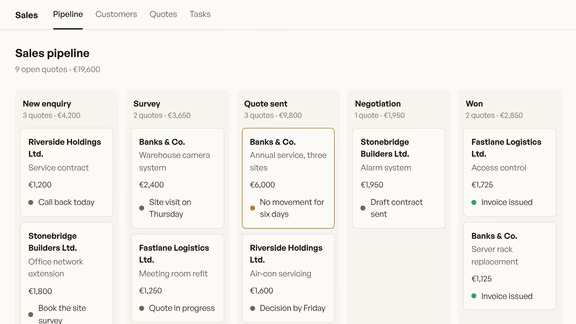
CRM
The sales side: who the customer is, where each quote stands and who needs a call back today. The customer never sees it.
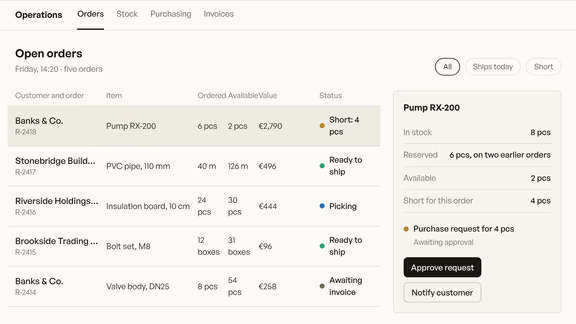
ERP
The operations side: stock, orders, purchasing and invoices in one system, alongside the invoicing and accounting you already use.
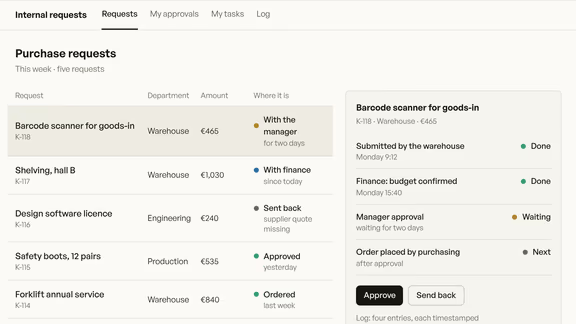
Internal system
When your process fits neither box and runs on spreadsheets and email today: approvals, job sheets, rotas, built around your own steps.
A CRM is your team’s side: who the customers are, where each quote stands, who to call back. The customer never sees it. A web application or client portal is the customer’s side: they sign in to order, upload, book or follow their case. The two often share the same data, which is why they are often built in one project.
Sometimes it is. If a ready-made tool covers the process and a handful of people sign in for the same few things, it costs less, and the review will say so. Custom software pays off when your process does not fit what the product can do, or when per-user pricing gets expensive across many occasional users.
The price list reads “Itemised quote after scoping”, because scope sets the figure: how many processes, how many roles, which systems it connects to. After the first call you get an itemised proposal with one amount, split into stages.
Yes, and we recommend it. We start with one process, the one that takes the most manual hours today, and at the end of each stage you try it on a live link with your own data. The first part works on its own, and you decide what comes next.
Yes, where the other system allows it: Shopify, Google Workspace and most invoicing platforms we connect directly. Where there is no direct connection, we use scheduled data transfers, and you can see what went across. The review covers every system you run, and the proposal prices each connection on its own line.
You do. The code, the data and the cloud accounts are in your name, and we work in them as invited collaborators. Access moves to you with the final invoice, and the system keeps running without us.
Start with who would use it
Tell us who would sign in, and what they handle in spreadsheets or email today. The first call starts from there.